

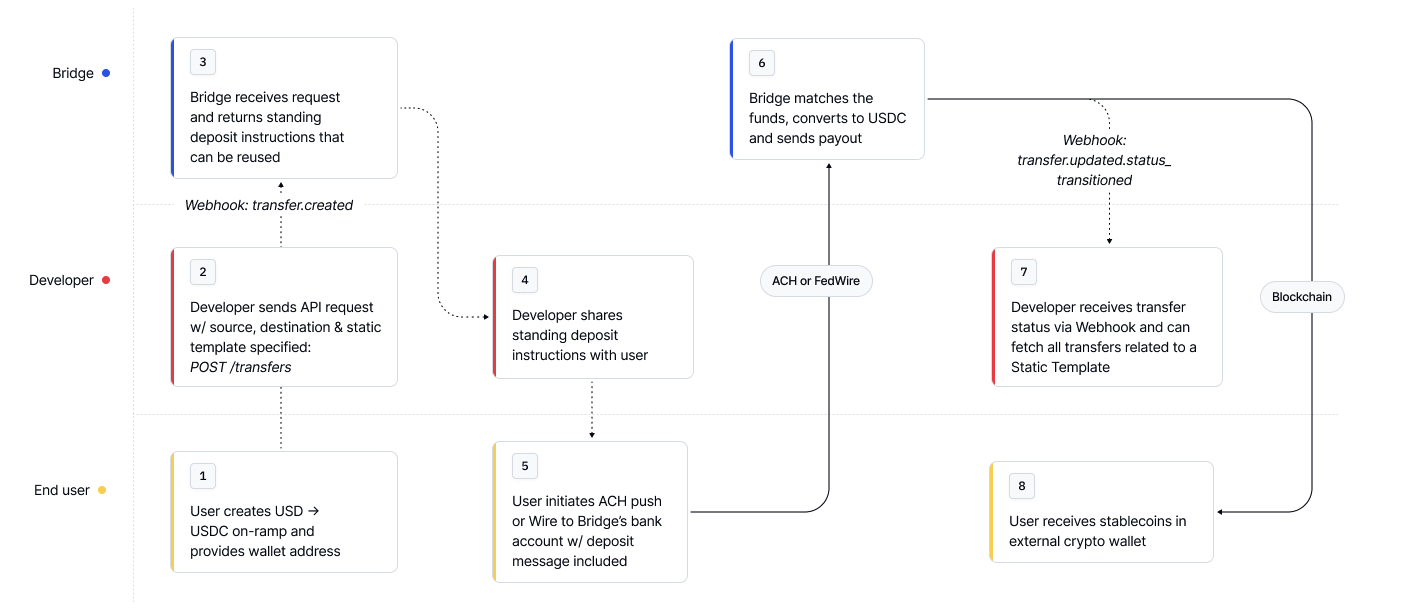
Step 1: Create a Static Template
Use the Create a transfer endpoint and set The response object will contain deposit instructions. You can share these with your customers. Every time your customers send Bridge a deposit with the message
"static_template": true.Request
BRGEXAMPLEMEMO, we will match it to this template, and create a new transfer instance.Response
Step 2: Customer sends funds
Each time funds match the template (e.g. via SEPA + deposit message), Bridge:Each resulting transfer instance is represented as a unique transfer object.
- Creates a new Transfer instance
- Processes the transfer automatically
- Sends you a webhook
- Makes it available to fetch at Get all transfers
Fetching static template created transfers via API
Use the template ID to list all matched transfers.Request
Response
Tips
- Omit “amount” to make the template flexible (
flexible_amount: true) - Use Update a transfer to modify template behavior (applies only to future deposits)
- Static templates use shared deposit instructions, unlike Virtual Accounts, which are customer-specific