Documentation Index Fetch the complete documentation index at: https://apidocs.bridge.xyz/llms.txt
Use this file to discover all available pages before exploring further.
Use Bridge’s APIs to convert from one fiat currency to another using a method we call the Stablecoin Sandwich.
What is a stablecoin sandwich?
A stablecoin sandwich uses stablecoin as mechanism to convert between two fiat currencies.
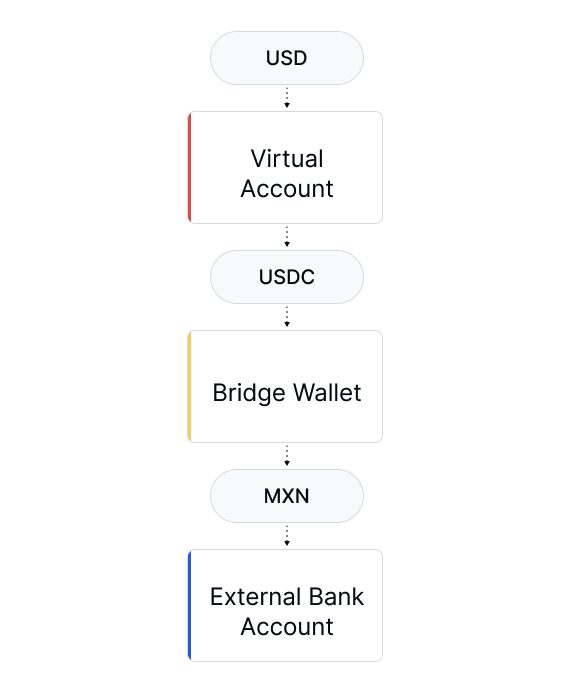
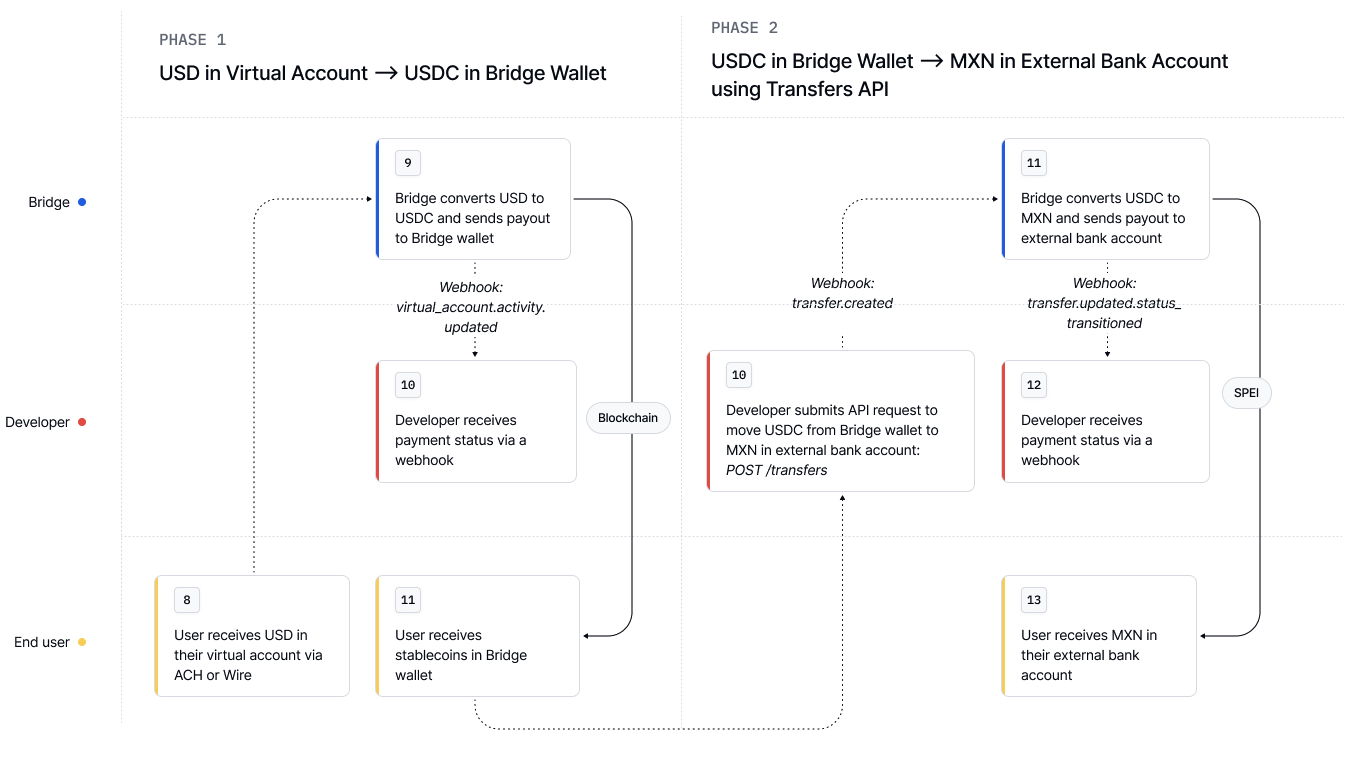
Funds flow
One-time setup
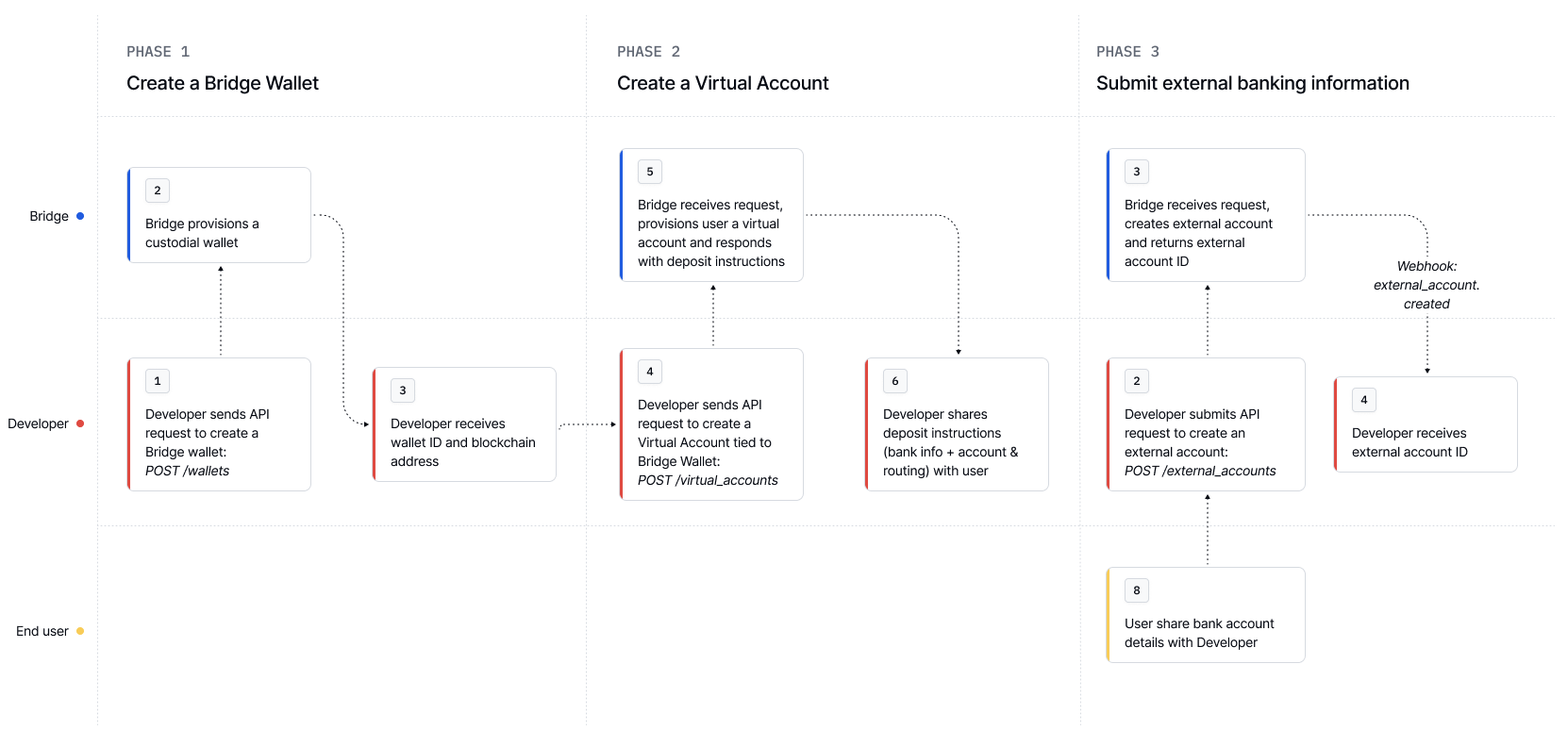
1. Create a Bridge wallet This wallet will hold stablecoins (USDC) used as the source for FX transfers. You can provision the wallet under your own customer id that you use for developing on Bridge. curl --location 'https://api.bridge.xyz/v0/customers/cust_alice/wallets' \
--header 'Api-Key: <API-Key>' \
--header 'Idempotency-Key: w1' \
--header 'Content-Type: application/json' \
--data '{
"chain":"solana"
}'
See all 7 lines
Use the returned wallet id in all future orchestration and payout requests. {
"id" : "ec89f8d1-7d0d-47a1-b92f-96f5eb25600e" ,
"chain" : "base" ,
"address" : "0x58b34dc21b5253053f53cf5f143c421266441058" ,
"tags" : [],
"created_at" : "2025-07-05T00:45:02.206Z" ,
"updated_at" : "2025-07-05T00:45:02.206Z"
}
See all 8 lines
2. Create a USD virtual account and point it to your Bridge wallet This is where your USD deposits (via ACH or Wire) will land. Funds will be auto-converted to USDC into your Bridge Wallet. curl --location --request POST 'https://api.bridge.xyz/v0/customers/cust_alice/virtual_accounts' \
--header 'Content-Type: application/json' \
--header 'Api-Key: <Api-Key>' \
--header 'Idempotency-Key: <Unique Idempotency Key>' \
--data-raw '{
"source": {
"currency": "usd"
},
"destination": {
"payment_rail": "bridge_wallet",
"currency": "usdc",
"bridge_wallet_id": "wallet_id"
}
}'
See all 14 lines
{
"id" : "1a400dae-f7fc-4f75-8105-212a14d4132d" ,
"status" : "activated" ,
"customer_id" : "cust_alice" ,
"created_at" : "2025-07-04T22:10:34.564Z" ,
"source_deposit_instructions" : {
"currency" : "usd" ,
"bank_name" : "Lead Bank" ,
"bank_address" : "1801 Main St., Kansas City, MO 64108" ,
"bank_routing_number" : "101019644" ,
"bank_account_number" : "215268120000" ,
"bank_beneficiary_name" : "Alice" ,
"bank_beneficiary_address" : "923 Folsom Street, 302, San Francisco, California 941070000, US" ,
"payment_rail" : "ach_push" ,
"payment_rails" : [
"ach_push" ,
"wire"
]
},
"destination" : {
"payment_rail" : "bridge_wallet" ,
"currency" : "usdc" ,
"bridge_wallet_id" : "wallet_id"
}
}
See all 25 lines
3. Configure an external account (MXN CLABE) Create an external account representing the recipient of the MXN funds. This only needs to be created once per recipient. curl --location 'https://api.bridge.xyz/v0/customers/23c2d462-4c69-4c5a-b31a-88d035d7e8ae/external_accounts' \
--header 'Idempotency-Key: ea-6' \
--header 'Content-Type: application/json' \
--header 'Accept: application/json' \
--header 'Api-Key: <api-key>' \
--data '{
"currency": "mxn",
"account_owner_type": "individual",
"first_name": "Carlos",
"last_name": "Ramirez",
"account_type": "clabe",
"account_owner_name": "Carlos Ramirez",
"bank_name": "BBVA Bancomer",
"clabe": {
"account_number": "626899715090851234"
},
"account_name": "Carlos Personal Bank Account",
"address": {
"street_line_1": "Av. Reforma",
"city": "Mexico City",
"state": "CDMX",
"postal_code": "06600",
"country": "MEX"
}
}'
See all 25 lines
4. Send a Transfer from USDC to MXN In step 1-3, you’ve created a virtual account that will receive USD deposits. With every USD deposit, we will forward those funds as USDC to your Bridge wallet. The last step is to go from USDC to MXN! Important: For crypto returns, use a static return address for the USDC leg. Avoid refund_to_sender to prevent returns going to an omnibus wallet .
curl --location --request POST 'https://api.bridge.xyz/v0/transfers' \
--header 'Api-Key: <API Key>' \
--header 'Idempotency-Key: <Unique Idempotency Key>' \
--data-raw '{
"on_behalf_of": "cust_alice",
"amount": "1000.0",
"source": {
"currency": "usdc",
"payment_rail": "bridge_wallet",
"bridge_wallet_id": "wallet_id"
},
"destination": {
"currency": "mxn",
"payment_rail": "spei",
"external_account_id": "mxn_external_account_id"
}
}'
See all 17 lines
Bridge executes the FX conversion at market rate and delivers MXN via SPEI , an instant 24/7/365 payment rail in Mexico.
Webhooks
Bridge emits webhooks for every orchestration state:
payment_initiated
payment_processed
cancelled
Use these to trigger business logic, notifications, or retries.
Alternative methods
In the above example, we used a transfer to create one time FX payment.
If you want to automatically convert USD to MXN upon receiving a deposit, you can:
In Step 2, point your virtual account to a liquidation address.
Point the liquidation address to the destination external bank account.
We design our APIs to be powerful and flexible lego blocks for developers to build a wide range of use cases.