

Overview
Bridge virtual accounts are permanent, reusable fiat deposit addresses that convert incoming fiat into crypto and deliver it to your specified destination (e.g. a wallet address). They support multiple currencies and provide customers with local deposit details like account numbers and routing codes. For example, a USD virtual account gives your customer a U.S. account and routing number for ACH or wire transfers. Supported Payment Rails- USD Virtual Accounts - U.S. bank account and routing numbers issued in your customer’s name.
- EUR Virtual IBAN - Euro-denominated IBANs for accepting SEPA payments.
- MXN Virtual Accounts - CLABE account numbers for receiving SPEI (Mexico) payments.
- BRL Virtual Accounts - BR codes for receiving PIX payments (only 1st party and 3rd party business payments supported).
- GBP Virtual Accounts - Account number for receiving FPS payments (only 1st party and 3rd party business payments supported).
- COP Virtual Accounts - Bre-B key for receiving Bre-B payments (only 1st party and 3rd party business payments supported).
Customers must be onboarded and KYC/KYB-approved before creating virtual accounts.
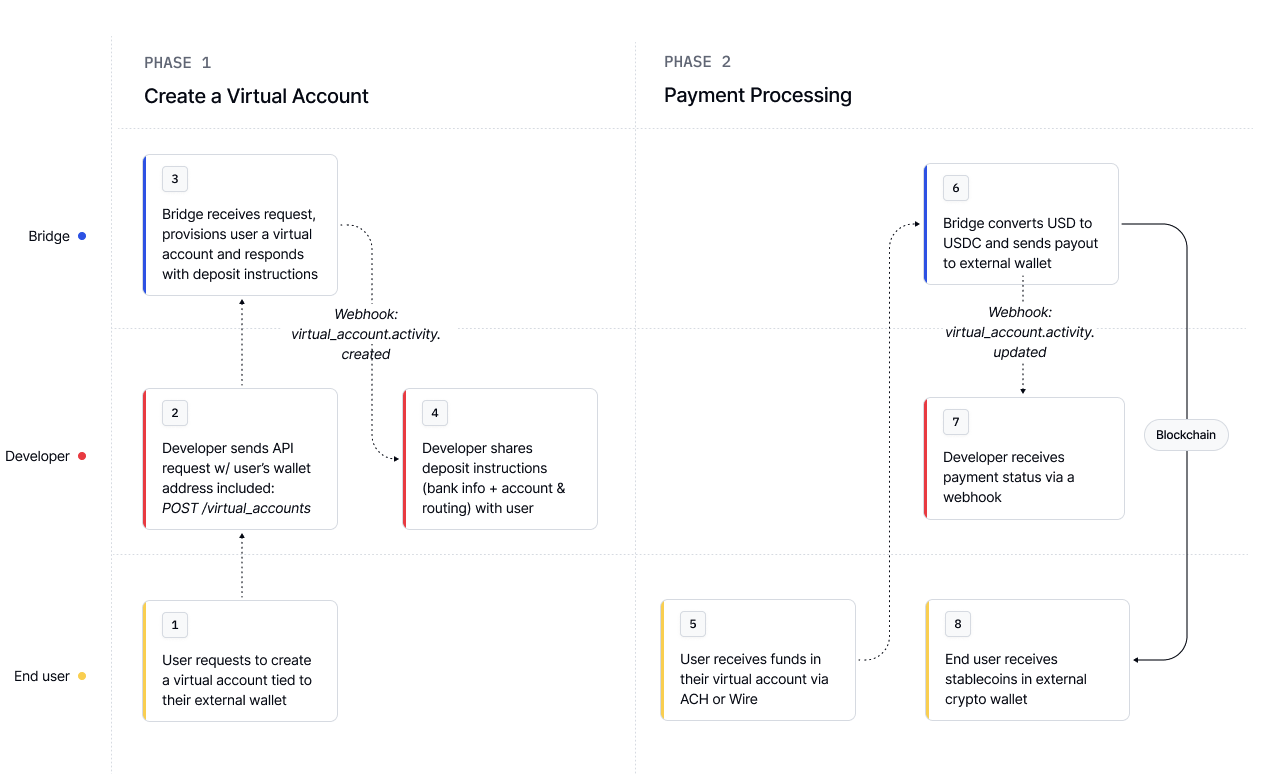
Step 1: Create a virtual account
Use the Virtual Accounts API to provision permanent fiat deposit addresses for your customers. You define thesource currency for the account and configure the destination to specify where Bridge should deliver the converted funds.
Bridge handles the fiat-to-crypto conversion and sends the funds on-chain automatically.
- USD Virtual Account
- EUR Virtual IBAN
- MXN Virtual Account
- BRL Virtual Account
- GBP Virtual Account
- COP Virtual Account
Request
Response
Sharing Deposit Instructions
Once a Virtual Account is created, use thesource_deposit_instructions object in the response to share the fiat deposit details with your customer. Funds sent to those details will be automatically converted and delivered to the crypto destination you specified.
Step 2: Monitoring virtual account events
Once a Virtual Account is created, your customer can start receiving fiat payments using the provided deposit instructions. Bridge automatically tracks the full lifecycle of each deposit—from the moment funds are received to the point they are delivered on-chain. Each event in this lifecycle is represented by aVirtualAccountEvent.
Event Creation and Tracking
Whenever a deposit is received, Bridge generates aVirtualAccountEvent with a unique id. You can:
- Fetch historical events using the Virtual Account Activity API.
- Receive real-time webhook notifications when:
- A new deposit is received.
- The status of an event changes (e.g. funds delivered, refund issued).
VirtualAccountEvent includes detailed information about the deposit, source, status, and destination.
Virtual account event types
Below are the different types of virtual account events you may receive. You can identify the type of each event by checking thetype field in the virtual account event object.
All transaction-triggered events include a
deposit_id field. This id is unique for each transaction that Bridge receives through this Virtual Account and can be used to link separate events to the same source transaction.Fetching virtual account activity
Request
Response