

- Individual customers: Personal users with personal information
- Business customers: Companies with business information and beneficial owners
- a Bridge hosted KYC link flow (so you don’t have to build your own KYC UI)
- the Customer API, which is used to pass relevant KYC/KYB info (if you prefer to control the KYC UI)
Key Terms
- KYC (Know Your Customer): Identity verification process required for compliance
- Endorsements: Approval for specific payment rails (USD, EUR, MXN, etc.)
- Terms of Service: Legal agreement customers must accept
Method 1: Using hosted KYC links (Quick Start - Recommended)
Bridge provides hosted onboarding flows so you don’t have to build your own KYC UI. This is the fastest way to onboard customers. You create the customer with the Customers API, then send them to a Bridge-hosted link to complete KYC.The
POST /v0/kyc_links endpoint is deprecated. Create customers with POST /v0/customers and fetch hosted KYC links with GET /v0/customers/{customerID}/kyc_link.Step 1: Collect Terms of Service acceptance
Request a ToS link and send your customer to it. Once they accept, you receive a
signed_agreement_id. See Terms of service.Request
Response
Step 2: Create the customer
Create the customer with the basics. The hosted KYC flow collects the rest.
Request
Response
Step 3: Fetch a hosted KYC link
Request
Response
url to complete identity verification. Use the url exactly as returned, and request a new one each time you need it: links can include a single-use access token, and can expire or be revoked. Verification typically takes less than a minute, and the customer’s status updates automatically once complete.Method 2: Direct API Integration (More Control)
Prefer to control the onboarding UI? You can collect and submit customer data directly to Bridge.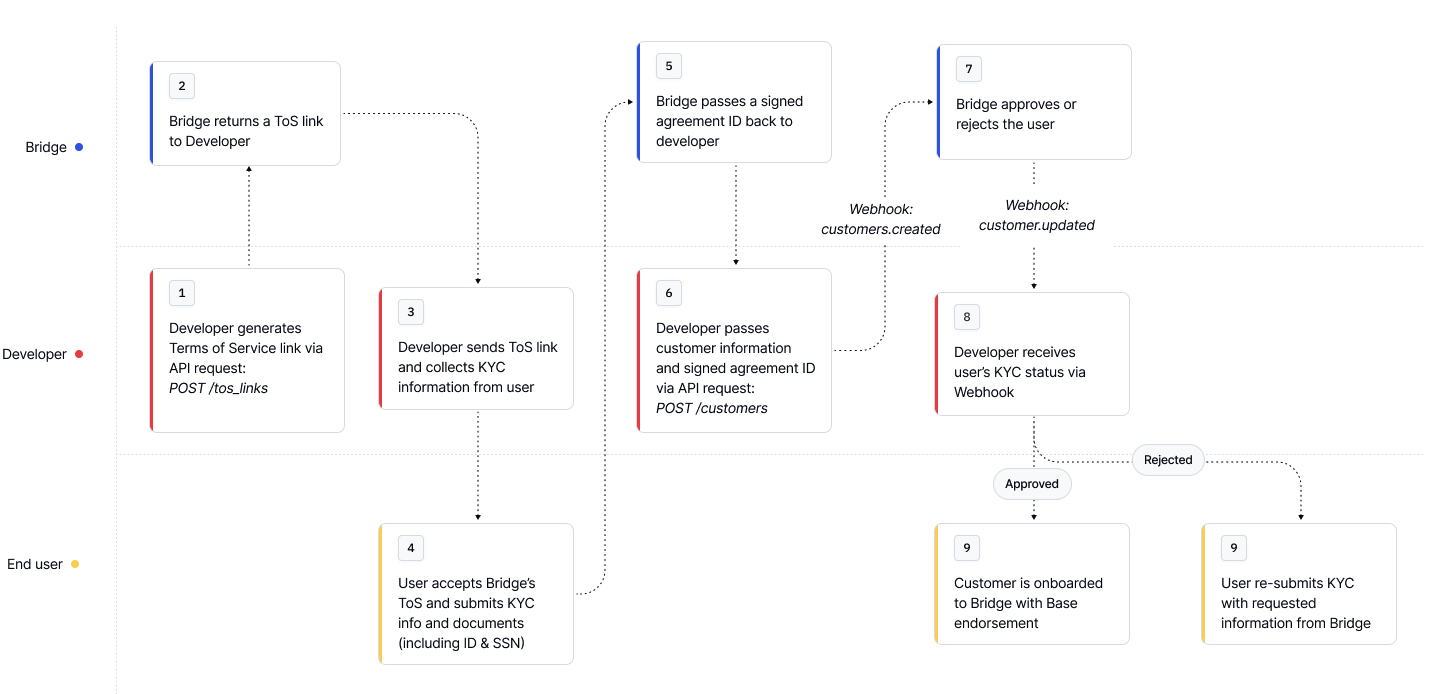
Step 2: Customer Endorsements: Enabling Transacting
A customer endorsement activates a customer to use a specific payment rail. Most flows automatically request a “base” endorsement when creating a customer.Endorsements represent an approval of a customer to onboard and transact with Bridge. To onboard a customer and enable them to take actions on Bridge, the customer must provide their KYC information and accept the terms of service for the required endorsement type.
Checking Customer Endorsement Status
Request
Example of an approved customer
Response
What’s next?
After creating your first customer:- Test the complete flow in your development environment
- Handle edge cases like rejections and additional requirements
- For detailed rejection reasons, see the Rejection Reasons
- To increase customer limits, see the Additional Requirements for Existing Customers
- Set up webhooks to receive real-time status updates for customers
- See Setting up webhooks for setting up your first webhook
- Review security practices to protect customer data