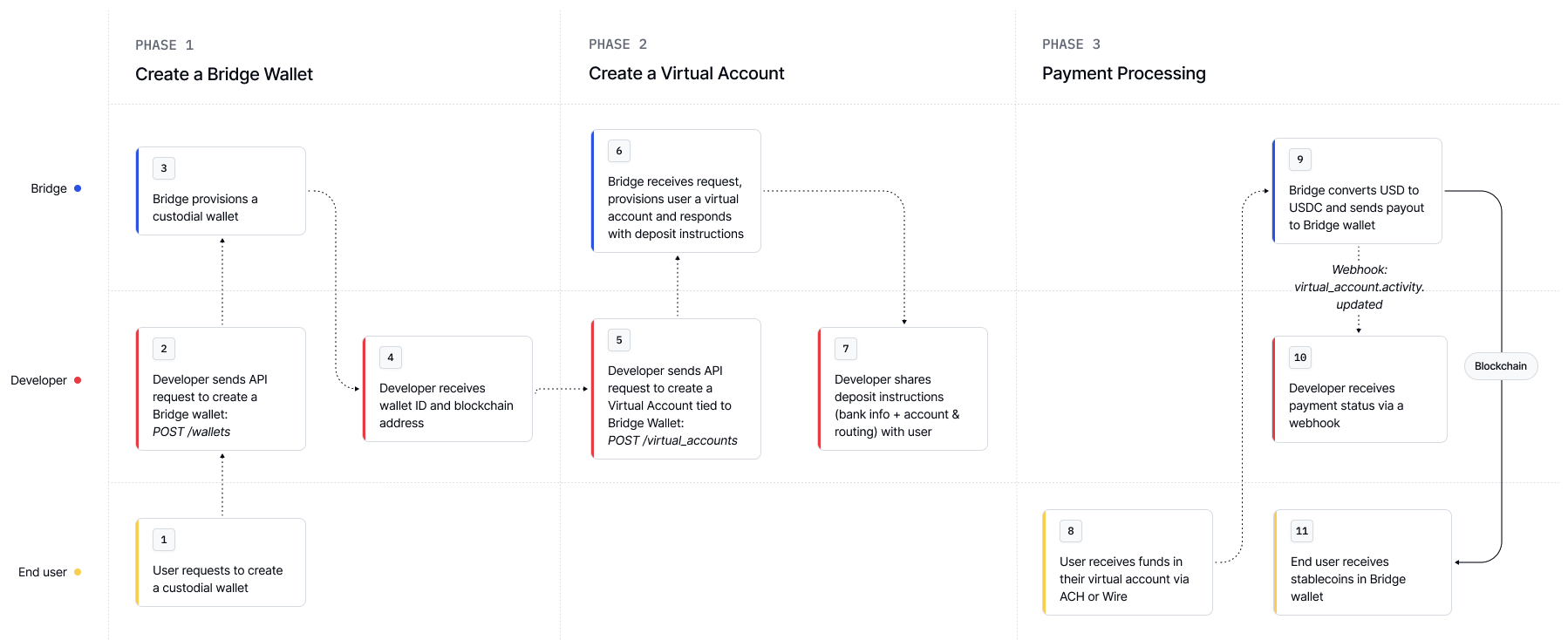
This guide walks you through creating a crypto wallet for a customer, then linking it to a virtual account so fiat deposits (e.g. ACH, SEPA) are automatically converted and delivered to the wallet as stablecoins.
1

Step 1: Create a wallet

Create a new Bridge-managed crypto wallet for your customer. This wallet will hold funds (e.g. USDB) and can earn yield.
Request
Response
Use the bridge_wallet_id (wallet_abc123 above) when referencing the wallet in other Bridge APIs.
2

Step 2: Create a virtual account that onramps to the wallet

Now, link the wallet to a virtual account. Any fiat deposits into the account will be automatically converted to USDB and delivered to the wallet.
Request
Response
3

Step 3: Share the virtual account address

Share the virtual account details (account and routing number) with your customer. When they send a fiat deposit, Bridge will:
  • Match the payment
  • Convert it to stablecoin (e.g. USDB)
  • Deliver it to the linked wallet
4

Step 4: Check wallet balance

Use this API to check wallet balances and confirm the funds have landed.
Request
Response