> ## Documentation Index
> Fetch the complete documentation index at: https://apidocs.bridge.xyz/llms.txt
> Use this file to discover all available pages before exploring further.
# Send wallet funds to a crypto address
Bridge wallets are secure, custodial crypto wallets that let you send and receive stablecoins with ease. Once you've provisioned a wallet for your customer or company, you can send and receive funds using orchestration API.
You must use Bridge’s orchestration APIs to move funds. **Do not attempt to send directly** from the wallet address.
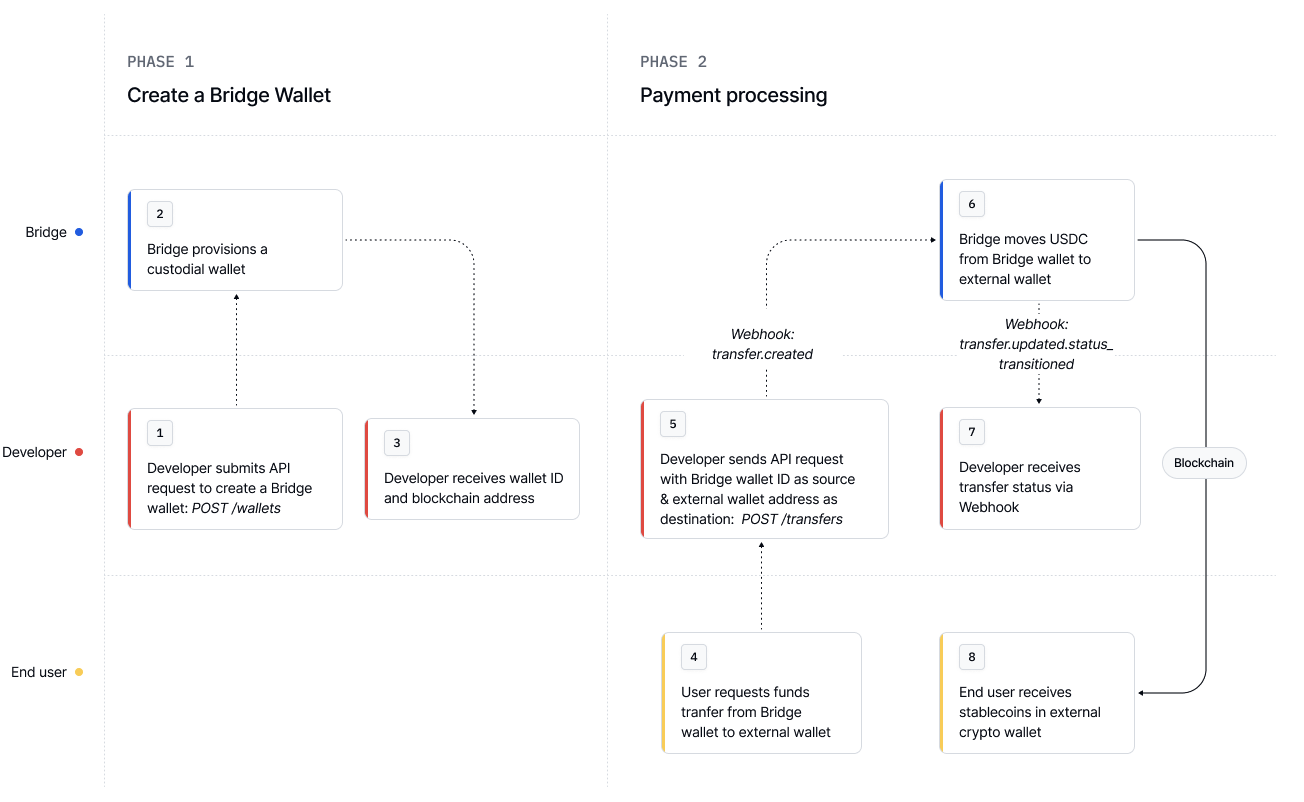
***
```bash Request expandable theme={null}
curl --request POST \
--url https://api.bridge.xyz/v0/customers//wallets \
--header 'Api-Key: ' \
--header 'Idempotency-Key: ' \
--header 'Content-Type: application/json' \
--data-raw '{
"chain": "solana"
}'
```
```json Response expandable theme={null}
{
"id": "wallet_123",
"chain": "solana",
"address": "the-blockchain-address",
"created_at": "2024-09-01T02:03:04.567Z",
"updated_at": "2024-09-01T02:03:04.567Z"
}
```
Note the `id` returned — this is your `bridge_wallet_id`.
Use the [Transfers](/api-reference/transfers/create-a-transfer) API with `bridge_wallet` as the source.
```bash Request expandable theme={null}
curl --location --request POST 'https://api.bridge.xyz/v0/transfers' \
--header 'Api-Key: ' \
--header 'Idempotency-Key: ' \
--header 'Content-Type: application/json' \
--data-raw '{
"amount": "10.0",
"on_behalf_of": "",
"developer_fee": "0.0",
"source": {
"payment_rail": "bridge_wallet",
"currency": "usdb",
"bridge_wallet_id": "wallet_123"
},
"destination": {
"payment_rail": "ethereum",
"currency": "usdc",
"to_address": "0xdeadbeef..."
}
}'
```
```json Response expandable theme={null}
{
"id": "transfer_abc",
"amount": "10.0",
...
"source": {
"payment_rail": "bridge_wallet",
"currency": "usdb",
"bridge_wallet_id": "wallet_123"
},
"destination": {
"payment_rail": "ethereum",
"currency": "usdc",
"to_address": "0xdeadbeef"
},
}
```
This will initiate a crypto transfer from your Bridge wallet to the specified blockchain address.
Use the Transfer ID returned in the response to monitor progress via the [Get a transfer](/api-reference/transfers/get-a-transfer) endpoint or by listening to webhooks -- learn more at [Setting up webhooks](/get-started/introduction/quick-start/setting-up-webhooks).
```curl Request expandable theme={null}
curl --request GET \
--url https://api.bridge.xyz/v0/transfers/ \
--header 'Api-Key: '
```