> ## Documentation Index
> Fetch the complete documentation index at: https://apidocs.bridge.xyz/llms.txt
> Use this file to discover all available pages before exploring further.
# USDT Self Serve Trading Endpoints
For developers on a fixed rate for USDT trading, when the market rate dips below their fixed rate their USD trades pause until the market rate returns to be above their fixed rate. To provide developers with the autonomy to manage these stuck trades, we’ve added new endpoints to
1. View which transfer and liquidation address trades are stuck
2. View the estimated market rate these trades would execute at
3. Execute at market rate to complete the transaction.
4. Set a threshold that triggers market execution if the market rate drops below the fixed rate.
With these endpoints, developers can take action directly or build workflows empowering their end users to do the same.
## **Get Stuck Trades**
* Transfer: `/transfers/pending`
* Liquidation Address: `/liquidation_addresses/drains/pending`
* *To check the specific parameters required to source stuck trades from these endpoints, please reference [List Pending Transfers](https://apidocs.bridge.xyz/api-reference/transfers/list-transfers-with-pending-usdt-trades#list-transfers-with-pending-usdt-trades) and [List Pending Drains](https://apidocs.bridge.xyz/api-reference/liquidation-addresses/list-drains-with-pending-usdt-trades).*
* Response:
```json theme={null}
"exchange_details": {
"fixed_rate": "0.999", // Fixed rate based on the developer bps fee.
"estimated_market_rate": "0.99796",
"updated_at": "2026-02-05T06:11:35Z"}
```
## **Post Execute Trades**
* Transfer: `/transfers/{transfer_id}/execute`
* Liquidation Address: `/v0/customers/{customer-id}/liquidation_address/ea06c74c-b1ab-4f24-ba82-16fb950f9081/drains/218f5fc9-9c94-4a08-9f37-bd58688f8382/execute`
* Response:
```json theme={null}
"exchange_details": {
"fixed_rate": "0.999",
"traded_market_rate": "0.99796"}
```
* When executing a trade, it will take 1 minute to complete. During this period the response of the Transfer/Liqudiation Address Drain will include “`trade_at_market”: true`
## **Get Responses For Each State**
1. **State: funds\_received**
```json theme={null}
"exchange_details": {
"fixed_rate": "0.999",
"estimated_market_rate": "0.99796",
"updated_at": "2026-02-05T06:11:35Z"}
```
2. **State: funds\_received - After Post Execute Trade**
```json theme={null}
"exchange_details": {
"fixed_rate": "0.999",
"estimated_market_rate": "0.99796",
"trade_at_market": true} // indicates trade has been submitted and is pending
```
3. **State: payment\_submitted**
```json theme={null}
"exchange_details": {
"fixed_rate": "0.999",
"traded_market_rate": "0.99796"}
```
4. **State: payment\_processed**
```json theme={null}
"exchange_details": {
"fixed_rate": "0.999",
"traded_market_rate": "0.99796"}
```
## **Market Rate Threshold Endpoint**
This threshold is the range developers can set to automatically execute trades at market rate should the market rate dip below their fixed rate. \
Ex. if developers fixed rate is 10 bps (0.999), developer can set their threshold to 15 bps (0.9985):
* Anything between 0.9985-0.999 will automatically execute at market rate (instead of being stuck and require manual execution).
* If market rate dips beyond 15bps, trades will get stuck (and they will be available to execute at market).
### **Enable Threshold**
* `/developer/trade_configurations`
```json theme={null}
{"source_currency": "usdt",
"destination_currency": "usd",
"market_rate_configuration": {
"market_rate_threshold": "0.9982",
"enabled": true}}
```
* Response:
```json theme={null}
{"source_currency": "usdt",
"destination_currency": "usd",
"fixed_rate": "0.999",
"market_rate_configuration": {
"market_rate_threshold": "0.9982",
"enabled": true,
"updated_at": "2026-02-11T03:30:00Z"}}
```
### **Get Threshold**
* `/developer/trade_configurations/usdt`
* Response:
```json theme={null}
{"data": [
{"source_currency": "usdt",
"destination_currency": "usd",
"fixed_rate": "0.999",
"market_rate_configuration": {
"market_rate_threshold": "0.9982",
"enabled": true,
"updated_at": "2026-02-11T03:30:00Z"}}
```
### **Update/Disable Threshold**
* `/developer/trade_configurations`
```json theme={null}
{"source_currency": "usdt",
"destination_currency": "usd",
"market_rate_configuration": {
"market_rate_threshold": "0.9982",
"enabled": false}}
```
* Response:
```json theme={null}
{"source_currency": "usdt",
"destination_currency": "usd",
"fixed_rate": "0.999",
"market_rate_configuration": {
"market_rate_threshold": "0.9982",
"enabled": false,
"updated_at": "2026-02-11T03:30:00Z"}}
```
## **Notifications**
While developers can monitor webhooks from
* `/transfers/pending `
* `/liquidation_addresses/drains/pending`
should a developer want to be notified in their Bridge Slack channel, this can be enabled by requesting from their Account Manager.
## **Dashboard**
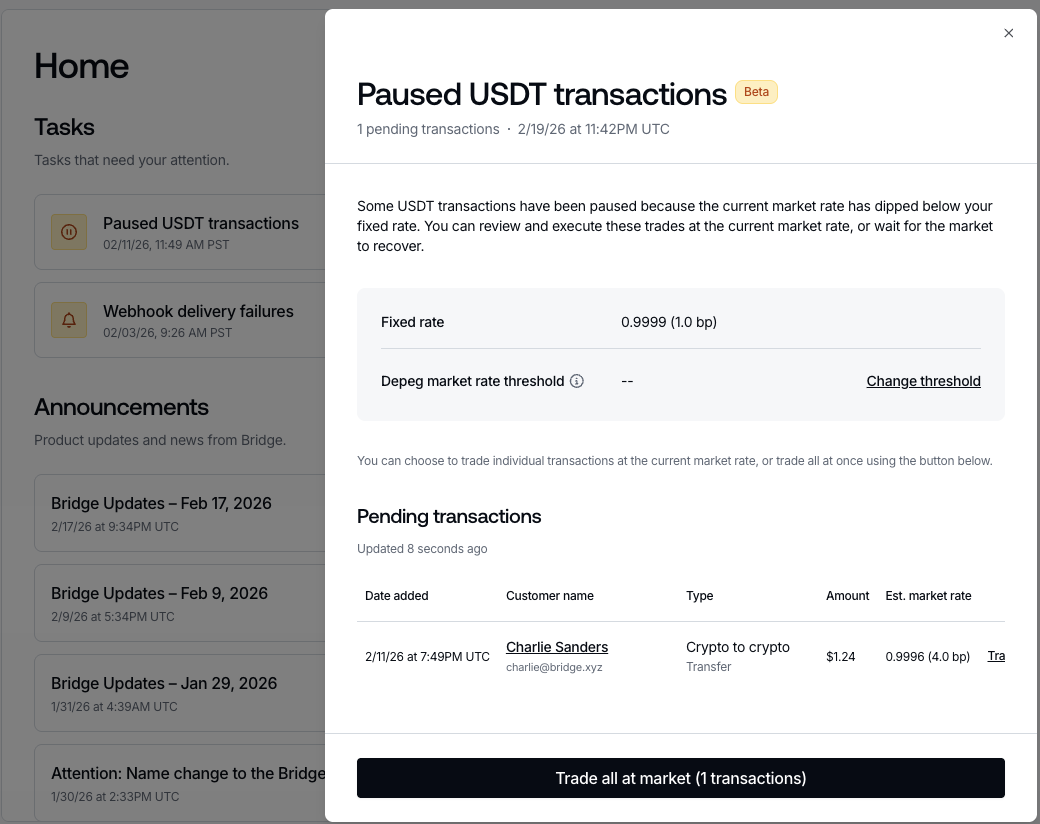
When a developer has USDT trades that are stuck, we present them with task “Paused USDT transactions” on their Home view:
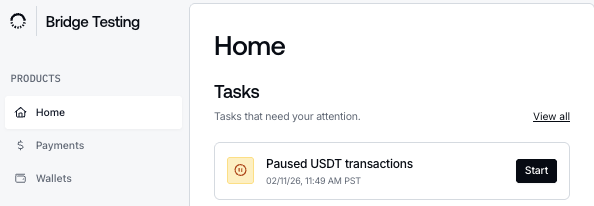 When clicking through the *Start* CTA of the task, developers are presented with actions to -
1. View/set depeg market rate threshold ([in Settings](https://dashboard.bridge.xyz/app/settings/organization/fixed-trade-rates)),
2. View/trade specific stuck trades at the market rate,
3. Trade all stuck trades at the market rate.
When clicking through the *Start* CTA of the task, developers are presented with actions to -
1. View/set depeg market rate threshold ([in Settings](https://dashboard.bridge.xyz/app/settings/organization/fixed-trade-rates)),
2. View/trade specific stuck trades at the market rate,
3. Trade all stuck trades at the market rate.