> ## Documentation Index
> Fetch the complete documentation index at: https://apidocs.bridge.xyz/llms.txt
> Use this file to discover all available pages before exploring further.
# Offramp with liquidation addresses
**Liquidation Addresses** are permanent on-chain addresses that auto-route incoming crypto to a fiat or crypto destination—enabling **crypto → fiat** or **crypto → crypto** conversions.
When funds are sent (e.g. USDC), Bridge converts and forwards them based on the `destination_payment_rail`:
* **Real-time rails** (e.g. wire, sepa, blockchains): funds are sent instantly
* **Batch rails** (e.g. ach): funds are queued and processed daily
***
## Routing crypto deposits to a fiat destination
You can create a liquidation address with a fiat destination (off ramp).
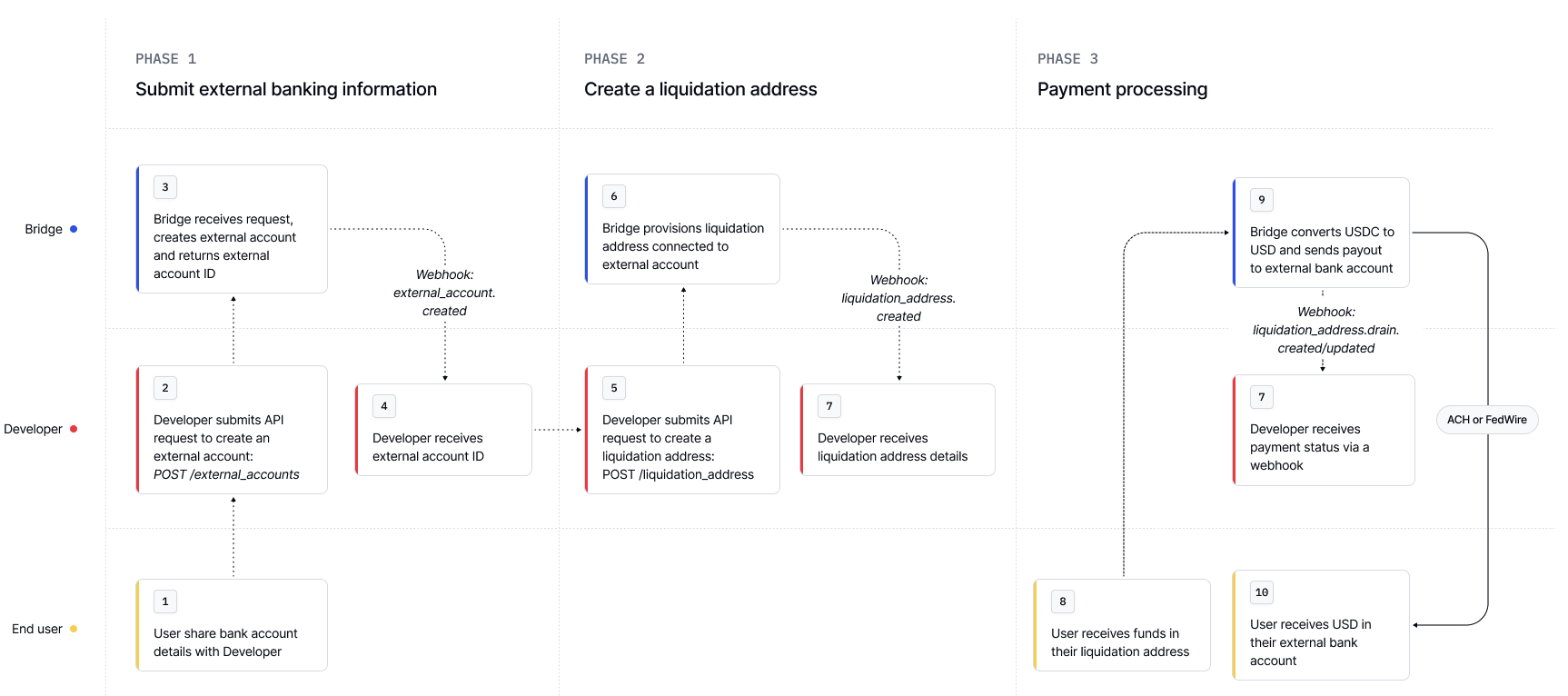
For fiat destinations, you need to first register your customer's external bank account with us. The following example walks through the option to create external bank accounts via the Bridge API. You also have the option to use Plaid to let your customers link bank accounts, please refer [External Accounts](/platform/orchestration/external-accounts/external-accounts-api) for more details.
```bash Request expandable theme={null}
curl --location 'https://api.bridge.xyz/v0/customers//external_accounts' \
--header 'Idempotency-Key: ea-7' \
--header 'Content-Type: application/json' \
--header 'Accept: application/json' \
--header 'Api-Key: ' \
--data '{
"currency": "usd",
"account_type": "us",
"bank_name": "Lead Bank",
"account_name": "Ada Checking Account",
"first_name": "Ada",
"last_name": "Lovelace",
"account_owner_type": "individual", // specifies an individual account
"account_owner_name": "Ada Lovelace",
"account": {
"routing_number": "101019644",
"account_number": "215268129123",
"checking_or_savings": "checking"
},
"address": {
"street_line_1": "923 Folsom Street",
"country": "USA",
"state": "CA",
"city": "San Francisco",
"postal_code": "941070000"
}
}'
```
```json Response expandable theme={null}
{
"id": "039c270f-a038-40be-be7b-43f550ce0678", // external account id
"customer_id": "23c2d462-4c69-4c5a-b31a-88d035d7e8ae",
"created_at": "2025-07-05T19:03:50.819Z",
"updated_at": "2025-07-05T19:03:51.251Z",
"bank_name": "Lead Bank",
"account_name": "Ada Checking Account",
"account_owner_name": "Ada Lovelace",
"active": true,
"currency": "usd",
"account_owner_type": "individual",
"account_type": "us",
"first_name": "Ada",
"last_name": "Lovelace",
"business_name": null,
"account": {
"last_4": "9123",
"routing_number": "101019644",
"checking_or_savings": "checking"
},
"beneficiary_address_valid": true,
"last_4": "9123"
}
```
```bash Request expandable theme={null}
curl --location 'https://api.bridge.xyz/v0/customers/23c2d462-4c69-4c5a-b31a-88d035d7e8ae/external_accounts' \
--header 'Idempotency-Key: ea-5' \
--header 'Content-Type: application/json' \
--header 'Accept: application/json' \
--header 'Api-Key: ' \
--data '{
"currency": "eur",
"account_type": "iban",
"bank_name": "Modulr Finance, Ireland Branch",
"account_owner_name": "Ada Lovelace",
"iban": {
"account_number": "IE26MODR99035507970528",
"bic": "MODRIE22XXX",
"country": "IRL"
},
"address": {
"street_line_1": "923 Folsom Street",
"country": "USA",
"state": "CA",
"city": "San Francisco",
"postal_code": "941070000"
},
"account_name": "GGCF Corporate",
"first_name": "Ada",
"last_name": "Lovelace",
"account_owner_type": "individual"
}'
```
```curl Response theme={null}
{
"id": "c8948ce6-26ac-4d37-a336-742f961a76f3",
"customer_id": "23c2d400-4c69-4c5a-b31a-88d035d7e8ae",
"created_at": "2025-07-05T18:45:50.728Z",
"updated_at": "2025-07-05T18:45:51.373Z",
"bank_name": "Modulr Finance, Ireland Branch",
"account_name": "GGCF Corporate",
"account_owner_name": "Ada Lovelace",
"active": true,
"currency": "eur",
"account_owner_type": "individual",
"account_type": "iban",
"first_name": "Ada",
"last_name": "Lovelace",
"business_name": null,
"iban": {
"last_4": "0528",
"bic": "MODRIE22XXX",
"country": "IRL"
}
}
```
```bash Request expandable theme={null}
curl --location 'https://api.bridge.xyz/v0/customers/23c2d462-4c69-4c5a-b31a-88d035d7e8ae/external_accounts' \
--header 'Idempotency-Key: ea-6' \
--header 'Content-Type: application/json' \
--header 'Accept: application/json' \
--header 'Api-Key: ' \
--data '{
"currency": "mxn",
"account_type": "clabe",
"account_owner_name": "Ada Lovelace",
"clabe": {
"account_number": "626899715090851234"
},
"account_name": "Ada Checking Account",
"bank_name": "BBVA Bancomer",
"first_name": "Ada",
"last_name": "Lovelace",
"account_owner_type": "individual",
"address": {
"street_line_1": "Av. Reforma",
"city": "Mexico City",
"state": "CDMX",
"postal_code": "06600",
"country": "MEX"
}
}'
```
```json Response expandable theme={null}
{
"id": "2bb5b814-0128-49a8-977a-77b1bc1cdee2",
"customer_id": "23c2d462-4c69-4c5a-b31a-88d035d7e8ae",
"created_at": "2025-07-05T18:59:42.163Z",
"updated_at": "2025-07-05T18:59:42.713Z",
"bank_name": "BBVA Bancomer",
"account_name": "Ada Checking Account",
"account_owner_name": "Ada Lovelace",
"active": true,
"currency": "mxn",
"account_owner_type": "individual",
"account_type": "clabe",
"first_name": "Ada",
"last_name": "Lovelace",
"business_name": null,
"clabe": {
"last_4": "1234"
}
}
```
With the liquidation address, you can configure
* the chain and currency you want to receive funds on
* the destination chain, currency, and details you want to send funds to
* Make sure to configure the `return_address` so we know where to send funds to if your customer's transaction fails or is returned by the destination.
```bash Request expandable theme={null}
curl --location 'https://api.bridge.xyz/v0/customers//liquidation_addresses' \
--header 'Content-Type: application/json' \
--header 'Accept: application/json' \
--header 'Idempotency-Key: 10' \
--header 'Api-Key: ' \
--data '{
"currency": "usdc",
"chain": "ethereum",
"external_account_id": "ad77b283-b000-4025-8197-023ea7e7d00",
"destination_wire_message": "Wire payment for Ada Lovelace",
"destination_payment_rail": "wire",
"destination_currency": "usd"
"return_address": "0x12343vrever323023fbverb94t24t23t" // very important to configure
}'
```
You'll get a response containing the blockchain address we've created.
```json Response expandable theme={null}
{
"id": "5ef43832-cb43-4c64-8678-e87c518b364f", // unique Bridge identifier for the liquidation address
"chain": "ethereum",
"address": "0x27013f44e72fea1788a00602c8abaf7ef57725f1", // this is the liquidation address
"currency": "usdc",
"external_account_id": "ad77b283-b0de-4025-8197-023ea7e7d978",
"customer_id": "23c2d462-4c69-4c5a-b31a-88d03",
"destination_wire_message": "Wire payment for Ada Lovelace",
"destination_payment_rail": "wire",
"destination_currency": "usd",
"created_at": "2025-07-05T00:10:05.670Z",
"updated_at": "2025-07-05T00:10:05.670Z",
"state": "active"
}
```
***
## Routing crypto deposits to a crypto destination
You also have the option to create a liquidation address with a crypto destination (crypto to crypto)
```bash Request expandable theme={null}
curl --location 'https://api.bridge.xyz/v0/customers/23c2d462-4c69-4c5a-b31a-88d035d7e8ae/liquidation_addresses' \
--header 'Content-Type: application/json' \
--header 'Accept: application/json' \
--header 'Idempotency-Key: 11' \
--header 'Api-Key: sk-live-5a0f22402efbc824139e5a7e719da2d5' \
--data '{
"currency": "usdt",
"chain": "ethereum",
"destination_payment_rail": "ethereum",
"destination_currency": "usdc",
"destination_address": "0x27013f44e72fea1788a00602",
"return_address": "0x2700w1240xrw1200cva0394",
}'
```
The response will contain the crypto address ready to start taking payments.
```json Response expandable theme={null}
{
"id": "24dc5860-c208-4ded-82ad-451cd88c6acd",
"chain": "ethereum",
"address": "0x50fba60922caa21375038824b4212f234v",
"currency": "usdt",
"customer_id": "23c2d462-4c69-4c5a-b31a-88d03",
"destination_payment_rail": "ethereum",
"destination_currency": "usdc",
"destination_address": "0x27013f44e72fea1788a00602",
"return_address": "0x2700w1240xrw1200cva0394",
"created_at": "2025-07-05T00:17:04.779Z",
"updated_at": "2025-07-05T00:17:04.779Z",
"state": "active"
}
```
***
## Monitoring liquidation address payments
### Drain History
When funds are deposited to a Liquidation Address, Bridge automatically “drains” those funds—converting and forwarding them to the configured destination. Each drain operation creates a **Drain Record**, which reflects the lifecycle of that individual payment.
* You can retrieve the full drain history for a given liquidation address using the [Get drain history of a liquidation address](/api-reference/liquidation-addresses/get-drain-history-of-a-liquidation-address)) endpoint.
* Bridge will also send you a **real time webhook** for new drains and state changes.
### Drain States
The `state` field tracks the status of each drain through its lifecycle. Here are the possible values:
| State | Description |
| ------------------- | ----------------------------------------------------------------------------------------------------------------------------------------- |
| `in_review` | The transaction is temporarily held for review. This usually clears automatically. If unresolved after 24 hours, Bridge will contact you. |
| `funds_received` | Bridge has received crypto and is preparing the outgoing payment. |
| `payment_submitted` | The outgoing payment has been sent. Confirmation pending (varies by payment rail). |
| `payment_processed` | Payment successfully completed. Depending on the rail, metadata may include a `tx_hash`, `imad`, or `trace_number`. |
| `undeliverable` | Bridge could not deliver the payment (e.g. invalid account or unsupported asset). |
| `returned` | Payment was sent but later rejected and returned to Bridge. |
| `refunded` | Funds that were returned have been re-sent to an alternative destination. |
| `error` | A system or network issue prevented processing. Manual intervention may be required. |
| `canceled` | The payment was canceled before submission—usually due to AML/EFE review or because it did not meet the minimum transfer threshold. |
> Drains can only move forward (`funds_received` → `payment_submitted` → `payment_processed`) and cannot go backward.
### Fetching liquidation address drain history
```bash Request expandable theme={null}
curl --request GET \
--url 'https://api.bridge.xyz/v0/customers//liquidation_addresses//drains' \
--header 'Api-Key: ' \
--header 'accept: application/json'
```
```json Response expandable theme={null}
[
{
"id": "drain_123",
"amount": "1.0",
"currency": "usd",
"state": "payment_processed",
"created_at": "2023-05-05T19:39:14.316Z",
"destination": {
"payment_rail": "ethereum",
"currency": "usdc",
"to_address": "0xb5a18db2e404fd5d234f1bec969cb071bed86f82"
},
"destination_tx_hash": "0x063834efe214f4199b1ad7181ce8c5ced3e15d271c8e866da7c89e86ee629cfb",
"deposit_tx_hash": "0x39debb5d410baddbae5755a8bb98827722b05f5f0e29e428239bf30fc7af2891"
},
{
"id": "drain_456",
"amount": "1.0",
"currency": "usd",
"state": "payment_processed",
"created_at": "2023-05-04T18:39:14.316Z",
"destination": {
"payment_rail": "ethereum",
"currency": "usdc",
"to_address": "0xb5a18db2e404fd5d234f1bec969cb071bed86f82"
},
"destination_tx_hash": "0x83f5ec78fdde7c48ad32cf2d7ec151fef578a0b6b123e37211a438521b234628",
"deposit_tx_hash": "0xe6d166219539d0c875a7a4e0806f43ca117a3aaa42440cf875b6e3398fb09060"
}
]
```
## Learn more
Learn more at at [Liquidation Addresses](/platform/orchestration/liquidation_address/liquidation_address)\
Configure fees via [Developer Fees](/platform/orchestration/fees-and-mins/devfees)\
View supported assets [here](/get-started/introduction/what-we-support/payment-routes)